Connecting RunScore to Your MYLAPS Account
To securely link RunScore with your MYLAPS Cloud Timing account, enter a unique API key. Think of this as a personal, secure credential that allows the two systems to communicate safely. The key is encrypted with the latest Microsoft encryption technology.
Enter your API key
With Cloud Timing enabled in RunScore, use the Cloud Timing menu:
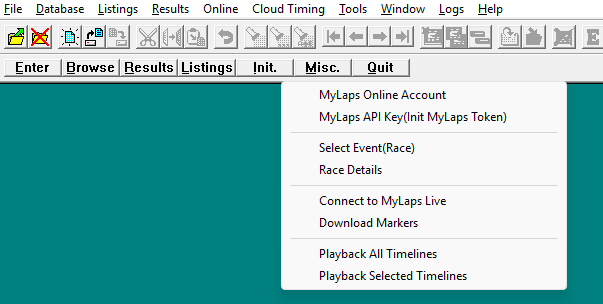
- Go to the Menu Bar.
- Select Cloud Timing, then choose MyLaps Online Account. This opens a link to the MYLAPS portal, where you can copy the API key.
- Select Cloud Timing, then choose MyLaps API Key (Init MyLaps Token).
- In the prompt that appears, enter your unique API key. The MYLAPS portal lets you copy the key, so you can paste it directly into RunScore.
- Click OK.
After you enter your key successfully, RunScore establishes a connection with your MYLAPS Cloud Timing account. The other options in the Cloud Timing menu become active and are no longer grayed out — you're ready to use the advanced cloud features.