How to Resolve Parameter Count Mismatch
Event 103002 (Listing Parameter Count Mismatch) occurs when a listing file calls an RSM (RunScore Macro) with fewer parameters than the macro expects.
The warning indicates that the macro was called with fewer parameters than expected. For example, you might see:
Insufficient parameters. Starting from the 7th parameter, the values will be empty.
Input data example: AGERES.RSM FEMALE F 40 49 3 5K
This may suggest that the listing file might not produce the expected output. For instance, if the file was edited and the fourth parameter was removed, adjustments for parameters %5 to %4 and %6 to %5 were likely not made. In the example below, %7 can be an additional command, and %8 can be the argument for that command.
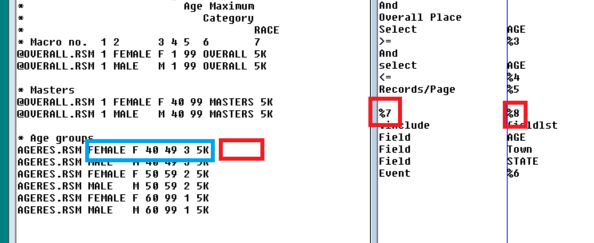
See Parameter Parsing Listing Files for background on RSM parameters.
Resolution steps
- Check that the provided parameters are correct.
- Check the usage of the RSM file. If it is called with six parameters, it is safe to remove
%7and%8. - Create a new RSM (for example,
AGERES8.RSM) and call it with eight parameters when needed, or any name that fits your workflow. - Or choose to ignore this warning if the missing parameters are intentional.
An RSM file supports up to 35 parameters. Calling a macro with the exact number of parameters it expects minimizes Runtime Validator warnings and runtime errors.
See also: Event Codes.