iPico Sport / ChipTiming
iPico Sport and ChipTiming (from Brazil) are unrelated chip systems, but RunScore is set up identically for both, so they're documented together. Both can send live data over TCP/IP or be read back from a saved file.
Unlike ChronoTrack or the MyLaps/ChampionChip family, iPico's and ChipTiming's own hardware runs the TCP server — RunScore connects out to it as the client, the same relationship as Macsha.
Setup (TCP)
Open the Initialize External Timers dialog, then on an empty slot:
- Set Device to
iPico SportorChipTiming, whichever matches your hardware. - Set Event to
*so RunScore assigns each passing based on the event fields below, or a specific event number to pin the slot to one event. - Leave Start/Stop at
Start. Stop skips the slot — RunScore does not open the connection. - Check the TCP box (Baud is hidden and unused).
- Set Port to
10200— both iPico and ChipTiming boxes listen on this port by default. - Click OK.
RunScore then prompts for the host's IP address:
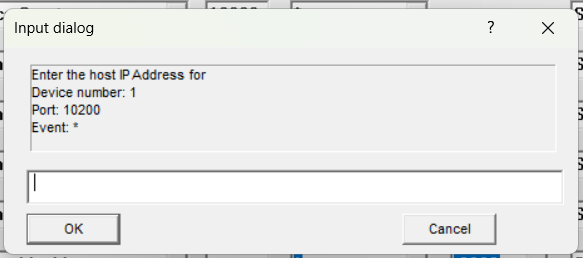
The address you enter is saved and pre-filled the next time you open this slot. Once connected, passings appear in Results.
Loading from a file instead
Open Enter/Edit Results for the target event, then use Ctrl+F9 or File > Load Chip file and pick the saved chip-data file. This runs the same record parser as the live TCP path (see Incoming data below).
Splitting data from multiple readers
If you have readers at more than one timing location (for example, a start mat and a finish mat), you have two options:
Option A: one RunScore slot per reader (recommended, matches the vendor's own setup guidance)
Configure a separate External Timers slot for each reader, each pinned to its own event:
| Slot | Device | Port | Event | TCP |
|---|---|---|---|---|
| 1 | iPico Sport | 10200 | START | checked |
| 2 | iPico Sport | 10200 | FINISH | checked |
Both slots use the same port (10200 is the box's fixed listening port, not a RunScore-assigned one) but connect to each reader's own IP address, entered when you click OK on that slot. Configure START as a start-type event (keep last time) and FINISH as a finish-type event (keep first time).
Option B: one connection, split by reader/channel in the Event Editor
If a single iPico/ChipTiming box aggregates reads from multiple physical antennas into one TCP stream, set the device's Event to * and use these Event Editor fields to split the incoming data instead of running multiple slots:
| Device | Packet field | Event Editor field |
|---|---|---|
| iPico Sport | Reader ID (2 hex digits, compared as decimal — hex 0A means Ear 10) | Ear |
| ChipTiming | Channel (single digit, 0–9) | Mat (range) |
This only takes effect on the first event in your event list — set the Ear/Mat field there (and on the events after it) so RunScore knows to start filtering; otherwise every read lands in that first event regardless of which reader sent it.
Incoming data
iPico Sport record format
A raw iPico record is a fixed-width ASCII string starting with the header bytes aa:
aa010580000ADD0F0000070202115001273C<cr><lf>
| Byte range (0-based) | Field |
|---|---|
| 0–1 | Frame header, literal aa |
| 2–3 | Reader ID (2 hex digits) — used for Ear-based routing |
| 4–15 | Tag ID, 12 hex digits, most-significant digit first |
| 16–19 | I/Q channel counters (not used by RunScore) |
| 20–25 | Date (not read by RunScore — see note) |
| 26–31 | Time, HHMMSS |
| 32–33 | Hundredths of a second (hex) |
| 34–35 | LRC checksum over bytes 2–33 |
| 36–37 | End of packet, CR/LF |
RunScore scans the incoming data for the aa header wherever it occurs, so an IP-address prefix some readers prepend to the raw packet (e.g. ip0100200062...) is skipped automatically — you don't need to strip it.
RunScore does not read the packet's own date field (bytes 20–25). Adjust Day compares the PC date to the Race Date (up to a 6-day span). If the reader's clock and the RunScore PC disagree on the date, times will be wrong regardless of what the packet says.
The tag ID is looked up as a chip number (via Look Up/the entries database chip field) — there's no bib-direct mode for iPico Sport, unlike MyLaps BibTag.
ChipTiming record format
ChipTiming records always begin with a leading blank — that's how RunScore tells a ChipTiming record apart from every other format:
1 1234567890ABCDEF08:32:27
| Position (0-based) | Field |
|---|---|
| 0 | Literal space (record-type marker) |
| 1 | Channel number, a single digit 0–9 — used for Mat-based routing |
| 2 | Unused separator character |
| 3–18 | Chip ID (16 characters) |
| 19 onward | Time, HH:MM:SS (optionally HH:MM:SS.hs with hundredths) |
Like iPico, the chip ID is looked up via the chip field — there's no bib-direct mode.
Gun times
iPico Sport can send a gun-start packet (ab header instead of aa). RunScore appends it to guntime.ini in the race folder as <event>,<time> instead of recording a passing. Live TCP and file load (Ctrl+F9) both accept this packet.
Chip Options
To send chip reads to Enter/Edit Names or the Announcer screen instead of Results, use Chip Options. That setting is global — it applies to every chip device, not just iPico/ChipTiming.