Initialize External Timers
Every clock-based or chip/tag device — whether it is listed under External Timers or Chip/Bib Timing — is wired up from the same dialog. Depending on your menu layout, open it from either:
- Tools → Initialize → External Timer, or
- Init. → Initialize External Timers...
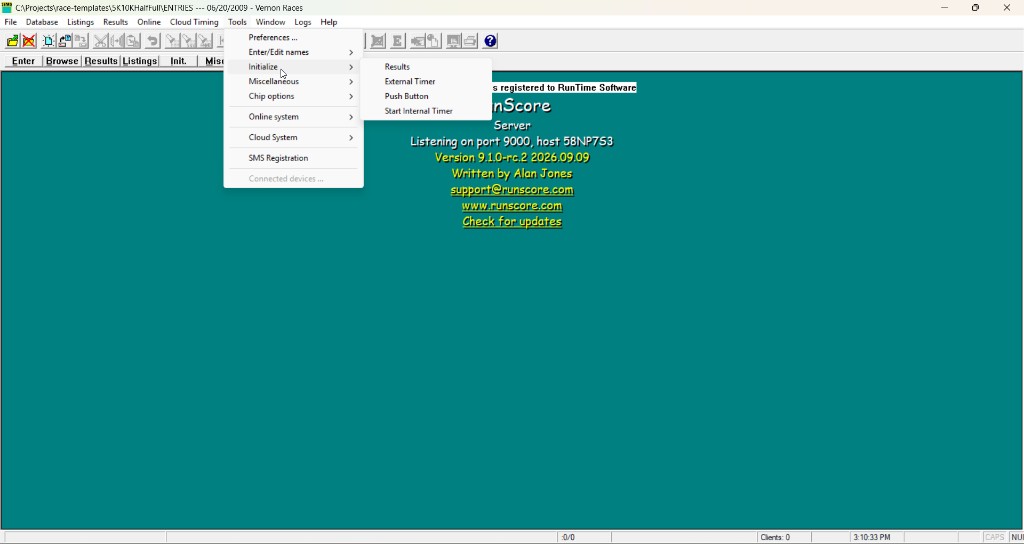

RSServer offers 8 timer slots; RSClient offers 4. Each slot configures one device independently, so you can run several timers at once (for example, a finish-line timer on one slot and a bar code reader on another).
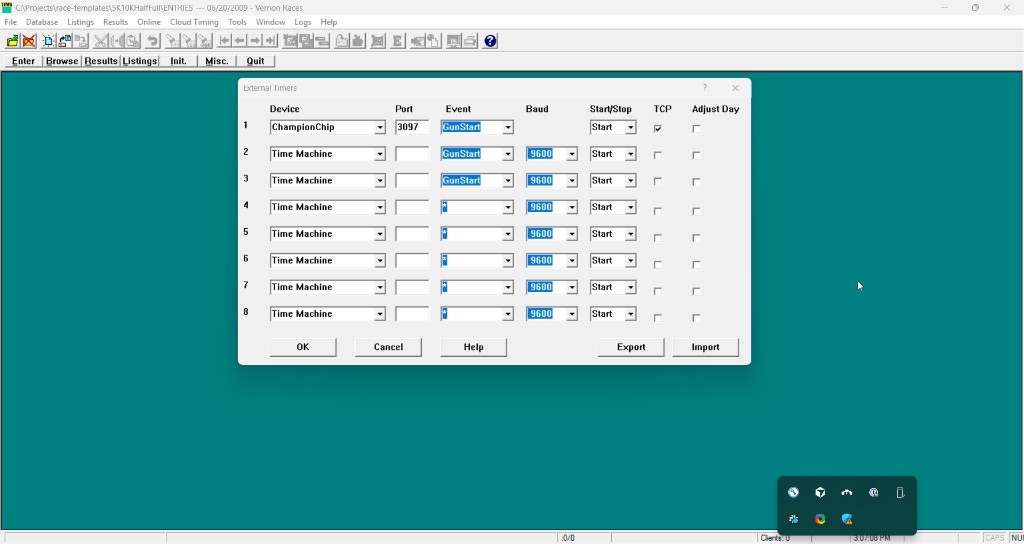
Columns
| Column | What it does |
|---|---|
| Device | Pick the timer/system from the dropdown. See the External Timers and Chip/Bib Timing tables for the full device list. |
| Port | COM port number for a serial connection, or the TCP port number when TCP is checked (see below). |
| Event | Which RunScore event/lane this slot's data goes to. * is a wildcard — the device itself tells RunScore which lane or event to use. |
| Baud | Serial baud rate. Hidden once TCP is checked — TCP devices don't use it. |
| Start/Stop | Pause or resume receiving data from this slot without losing its configuration. Stop skips the slot entirely — RunScore does not open the port. TimeTech timers still buffer times internally; after you set the slot back to Start, retrieve them from the timer using its Transmit Times mode. |
| TCP | Check this if the device connects over TCP/IP instead of a serial port. For most devices the device is the TCP server and RunScore connects out as the client. For server-mode devices (listed below) RunScore instead listens for the device to connect in. |
| Adjust Day | Most useful with chip/tag systems such as the RunScore Open Interface. When checked, if an incoming passing's date is up to 6 days before the configured Race Date, RunScore adds the missing days automatically. |
For these devices, RunScore acts as the TCP server (listens for incoming connections): ChampionChip, MyLaps BibTag, MyLaps ProChip, ChronoTrack, J-chip, Active Timing, RunScore Open, and race|result.
All other TCP devices expect RunScore to connect out to them as a client.
Port numbers: TCP vs. serial
- TCP checked: the port must be 1024–65535.
- TCP unchecked (serial/COM): the port must be 1–4096.
Older documentation for some devices suggests using a TCP port in the 49152–65535 "dynamic" range as a convention to avoid conflicts with other software — that's a suggestion, not a requirement. RunScore itself accepts any TCP port from 1024–65535.
Keyboard-mode devices
Some devices — a serial-port bar code reader, for example — send data through the serial port as if it were typed on the keyboard. Select Key Board as the Device for these; RunScore places the incoming characters straight into the keyboard buffer, the same way the reader's own driver would.
Import and Export
Use the Export and Import buttons to move all 8 (or 4) slots between machines as a JSON file, instead of re-entering each one by hand.
- Export writes every slot — device, port, baud, Event, Start/Stop, TCP, Adjust Day, and server IP — to a JSON file. Default filename is
timers-server.json(RSServer) ortimers-client.json(RSClient). The Event column is stored aslanein the file. - Import overwrites all current slots from a JSON file after a confirmation prompt. Imported devices are not started automatically — reopen this dialog and click OK to apply them.
Exported files are specific to which app produced them (RSServer vs. RSClient) and are rejected if imported into the other app.
Debug mode
If a device isn't sending times, open Enter/Edit Results and press Alt+D to turn on debug mode. A pop-up shows the raw characters as they arrive — or their hex values for TimeTech, TimeTech Select, TimeTech X, Push Button, Winning Time, and Ultrak — which helps tell a cabling problem from a configuration problem.