Tools Menu Overview
The Tools menu holds RunScore's settings and setup utilities. This page lists every item on it and links to the page that covers each one, where one exists.
Init. opens the same four commands as Tools → Initialize. Misc. opens the Tools → Miscellaneous items, plus Edit entries.ini update file, Edit events_mapping.ini file, and View Guntime.ini.
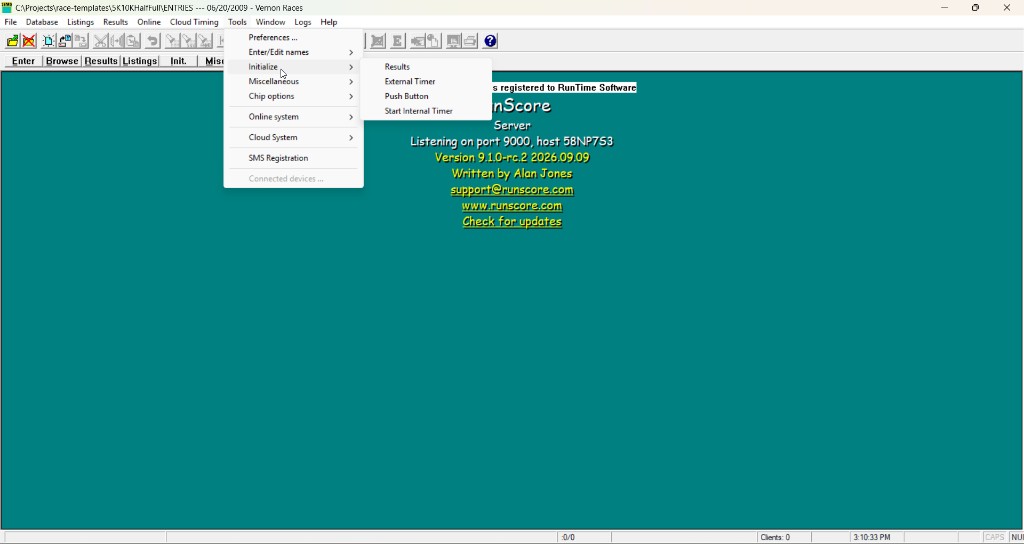
Menu items
These are the items on the RSServer Tools menu, from top to bottom.
| Item | What it does | Details |
|---|---|---|
| Preferences | Settings that apply to every race, such as bib auto-increment and auto-save. In 9.1, the window can also export and import your settings. | Preferences, Import / Export |
| Enter/Edit names | Submenu for the participant entry screen and its files: Design screen, Edit entries.ini update file, Erase ALL names, and more. | Tools → Enter/Edit Names |
| Initialize → Results | Erases the bib numbers and times in one event, or in every event with Clear All, to prepare for a new race. | Preparing for a new race |
| Initialize → External Timer | Connects timers and chip systems, with one slot per device. | Initialize External Timers |
| Initialize → Push Button | Records a time each time someone presses a push button connected to a COM port. | — |
| Initialize → Start Internal Timer | Starts a race clock inside RunScore for select timing. | Internal timer |
| Miscellaneous | Submenu of race utilities, including the three items below. | Tools → Miscellaneous |
| Miscellaneous → Edit list of Events | Defines the race's scoring events, such as starts, splits, and the finish. | Defining your scoring events |
| Miscellaneous → View MergeProb.txt | Opens the list of runners a listing found in more than one event. RunScore writes it only when Merge errors to file: MergeProb.txt is on. | Preferences |
| Miscellaneous → Simulate a race | Replaces an event's results with generated finishers, so you can test your listings. | Simulate a race |
| Chip options | Sets where chip reads go (To results by default), whether an ID is a bib or a chip, and how chip files load. | Chip Options |
| Online system | Connects RunScore to online registration and results services, such as Race Roster. | Online |
| Cloud System | Turns on MYLAPS Cloud Timing. | MYLAPS Cloud Timing |
| SMS Registration | Saves the login and password for your text-message (SMS) provider. You only need to enter them once. | SMS Options |
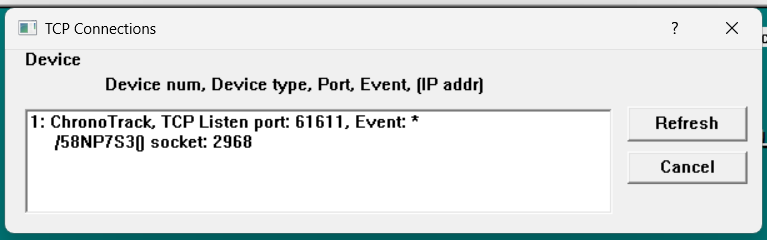
| Connected devices | Lists each running timer or chip reader, with its port and event. The item stays gray until a device is running. | — |
The Connected devices window is titled TCP Connections:
Register RunScore is on the Help menu. It moved there from Tools in version 9.0. See Registration & Updates.
RSClient
RSClient shows a shorter Tools menu: Preferences, Initialize, View MergeProb.txt file, Chip options, and Connected devices. Results stays gray unless the role has Can initialize results. External Timer, Push Button, and Start Internal Timer stay gray unless the role has Can initialize external/internal timers. All four stay gray until a race is open. See Security → Permission matrix.