Tools → Miscellaneous
This submenu (also reachable via the Misc. button on the Master Menu) groups a handful of unrelated utilities.
Documented elsewhere
- Simulate a race — generate synthetic results for testing. Covered in Enter/Edit Results → Simulate a race.
Online system and Cloud System are separate popups directly under Tools, at the same level as Miscellaneous — not items inside it. See Online and Timing → Cloud Timing.
Edit list of Events
Adds, removes, or reorders the scoring events in Events.xml — see Race Configuration → Defining your scoring events. Select an event and click Edit to open the Edit Event dialog.
Repeat reads on a mat
A runner can cross and recross a mat or antenna, producing several reads. RunScore keeps one read per runner, chosen by the event type in the Edit Event dialog:
- Start (last) — keeps the last read, when the runner finally leaves the mat. Use it on start-mat events such as
ChipStart. - Split (first) and Finish (first) — keep the first read.
- Default — also keeps the first read. Don't leave a start-mat event on Default.
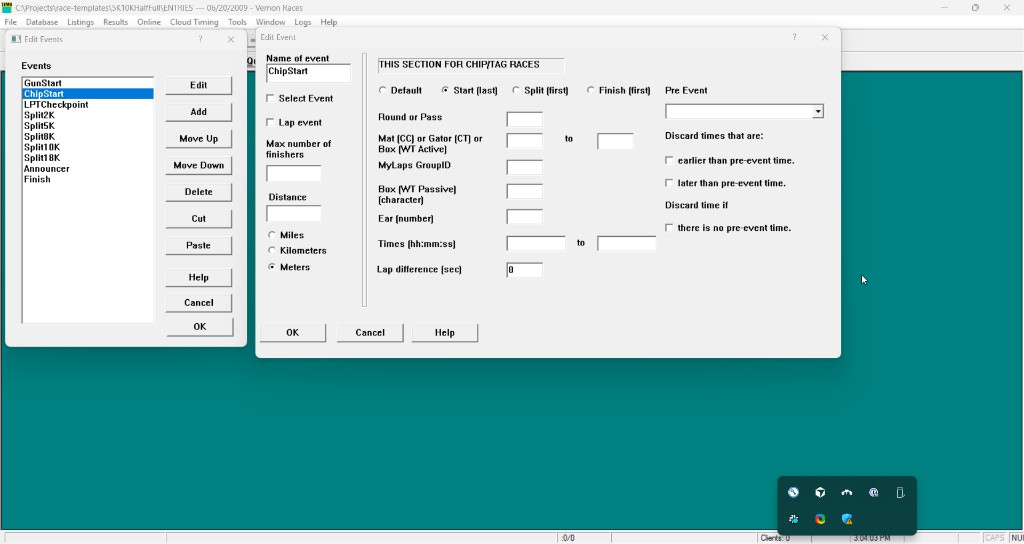
A Lap event keeps every read except one that falls within the Lap difference of an earlier read for that runner. The other chip fields in this dialog are covered in Event routing.
Not yet documented
These items don't have a doc page yet:
- View MergeProb.txt — the merge-error log file written when Merge errors to file is enabled in Preferences.
- Ignored Chips / Ignored Cloud Chips — chip reads RunScore has discarded.
- Display active clients — lists currently connected RSServer clients.
- Clients table / Roles table — RSServer client-connection and permission-role management.