Preferences
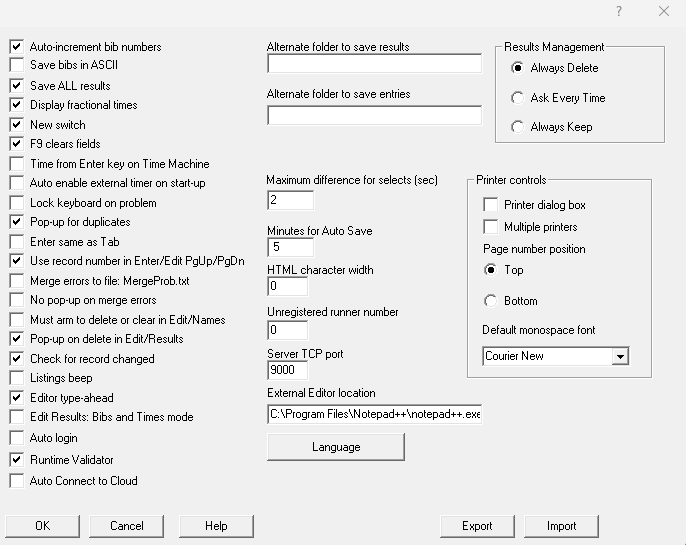
Global settings for all races. Open Tools → Preferences. Stored in the Windows Registry (shared if Server and Client run on the same PC).
RSServer
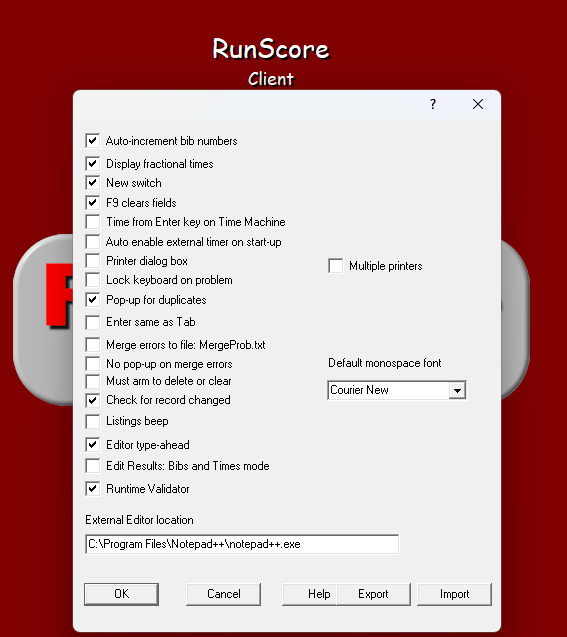
RSClient
Client Preferences are a subset of Server.
Preference flags
| Preference Flag | Description | Default | Scope | Notes |
|---|---|---|---|---|
| Auto-increment bib numbers | After adding an entry, advance or clear the bib field | On | On: bib +1. Off: bib blank | |
| Save bibs in ASCII | Write ASCII bib numbers when saving results | Off | Server | Import into another DB that shares bibs |
| Save ALL results | On F10, also save bibs/times for all events | On | Server | Disabled while the network is active |
| Display fractional times | Results screen time precision | On | On: 0.01 s. Off: whole seconds | |
| New switch | Push-button timer wiring | On | Two-wire (“new”) vs three-wire (“old”) | |
| F9 clears fields | Allow F9 to clear the current entry | On | Off: F9 locked during data entry | |
| Time from Enter key on Time Machine | Record a Time Machine ENTER press with no bib selected | Off | Off: discarded. On: recorded as a bandit entry (bib -1) | |
| Auto enable external timer on start-up | Enables the external timer automatically when a race opens | Off | Eliminates manual timer activation | |
| Lock keyboard on problem | Block input on results errors (e.g. duplicate) | Off | When Pop-up for duplicates is also On, locks the keyboard and plays an alert tone until Cancel/Esc | |
| Pop-up for duplicates | Modal dialog on duplicate bib in results | On | Off: message only, no blocking dialog | |
| Enter same as Tab | Enter key in Enter/Edit Names | Off | Off: first field next line. On: same as Tab | |
| Use record number in Enter/Edit PgUp/PgDn | PgUp/PgDn walk order | On | Server | On: record number. Off: bib |
Merge errors to file: MergeProb.txt | Write merge errors to file | Off | Multi-chute conflict errors → MergeProb.txt | |
| No pop-up on merge errors | Suppress merge error dialogs | Off | Pair with write-to-file for bulk fixes | |
| Must arm to delete or clear | Gate destructive Enter/Edit Names actions | Off | Delete: Ctrl-F2→F2. Clear field: Ctrl-F5→F5 | |
| Pop-up on delete in Edit/Results | Confirm before deleting bib/time | On | Server | Dialog notes Ctrl-F2 can disable warning |
| Check for record changed | Warn on leave if Enter/Edit record dirty | On | Off: no unsaved-change prompt | |
| Listings beep | Beep when a listing file runs | Off | Audible start confirmation | |
| Editor type-ahead | Autocomplete listing/editor commands | On | Off: no fill-in; command drop-down remains | |
| Edit Results: Bibs and Times mode | Force bibs-and-times edit mode | Off | Ties each bib to its time (bib/tag races) | |
| Auto login | Prompts the online system login dialog upon opening a race | Off | Server | Requires active network connection |
| Runtime Validator | Enable Runtime Validator checks | On* | See Runtime Validator | |
| Auto Connect to Cloud | Connect to cloud timing on start | Off | Server | |
| Alternate folder to save results | Extra copy destination on F10 | (blank) | Server | |
| Alternate folder to save entries | Backup on Browse F11 / auto-run | (blank) | Server | Saves entries.dta + entries.frm |
| Maximum difference for selects (sec) | Select-times match window | 2 | Server | Highlight pairing when Δt within value |
| Minutes for Auto Save | Periodic results save interval | 5† | Server | Stored internally as counts = minutes × 300. Set to 0 to disable |
| HTML character width | Browser (F8) listing column spacing | 0 | Server | 13 typical; 0 disables HTML output |
| Unregistered runner number | Bandit bib number (reusable across entrants) | 0 | Server | Blank disables URN |
| Server TCP port | Client listen port | 51760‡ | Server | Enforced range 1024–65535; IANA recommends 49152–65535. Independent of any chip-timing system's TCP port |
| External Editor location | Path for output editor | (blank) | Blank → Notepad | |
| Language | Language for items in listing reports | English | Server | |
| Results Management | What Erase ALL names does with existing results | Always Delete | Server | Radio group: Always Delete / Ask Every Time / Always Keep. See Results Management |
| Printer dialog box | Show printer dialog on listing Print | Off | Off: listing Copies / Orientation apply reliably | |
| Multiple printers | Multi-printer print UI | Off | ||
| Page number position | Listing page number placement | Top | Server | Top or Bottom right |
| Default monospace font | Listing font | Courier New | Fixed-pitch TrueType only |
* First install / missing registry key enables Runtime Validator.
† Typical installed value; internally stored as counts = minutes × 300 (e.g. 5 minutes = 1500 counts). A clean registry defaults to 0 (disabled).
‡ RunScore's internal default is 0; installers/registry commonly set 51760.
Results Management
Only Tools → Enter/Edit names → Erase ALL names reads this setting. Erase ALL names always deletes the names; this setting decides what happens to the results (bibs and times in every scoring event). See Erase ALL names for what each option does.
Removed from Preferences
- Number of chip fields — set per race in
entries.ini.
Import / Export (JSON)
Built-in JSON Import and Export for Preferences and External Timers. Use this to move settings to a new laptop or standardize a fleet of timing machines without re-entering values.
| Dialog | Default export name (Server) | Default export name (Client) |
|---|---|---|
| Preferences | prefs-server.json | prefs-client.json |
| External Timers | timers-server.json | timers-client.json |
- Credentials excluded — login, password, and SMS secrets are not written to the file.
- Export / Import use dedicated file pickers; Preferences and External Timers are independent.
- Fleet standardization — export from the primary machine, import on secondary/backup laptops.
- Format validation — import rejects mismatched Server vs Client files (
source_app) and invalid JSON schemas.
On Preferences: Export / Import at the bottom of the dialog. Import overwrites current Preferences after confirmation.
Form validation
Field properties (Search field, Unique field, etc.) write to {database}.val.xml. See Design Screen → Form validation.